
 Seedream 5 Flash: online AI image generator
Made with Seedream 5 Flash on Klonify
Real results generated with Seedream 5 Flash at the cheapest setting, with no retouching. The exact prompt and the credit cost are under each example.

A cozy reading nook by a rainy window, armchair with a knitted blanket, a mug printed with "Klonify" on the side table, warm lamp light.
4:5 · 4 credits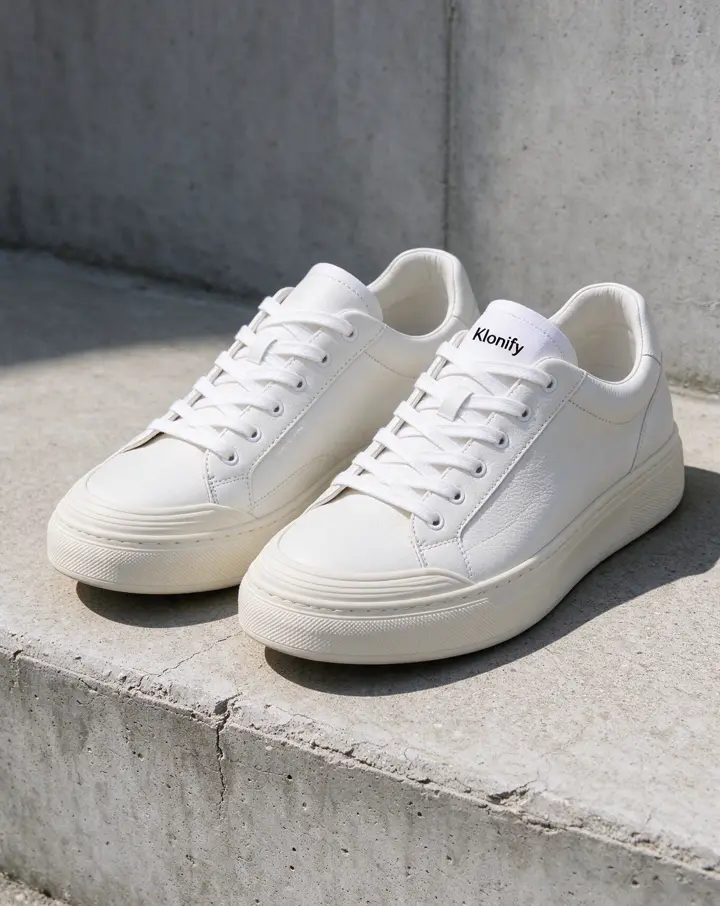
Product photo of a pair of white leather sneakers with "Klonify" printed on the tongue, on a concrete step, hard sunlight and crisp shadows.
4:5 · 4 credits
What Seedream 5 Flash does
Seedream 5 Flash is the fast, very cheap version of ByteDance's Seedream 5. It creates images from text or up to 4 photos.
Model built by ByteDance, ready to use right in the Klonify studio.
What Seedream 5 Flash does best
Very cheap
A few credits per image: ideal for producing at volume.
Fast
Variations arrive quickly so you can pick the best one.
Same style as Seedream 5 Pro
Test here, then rerun in Pro for the final version.
Prompt examples for Seedream 5 Flash
Copy an example into the creation bar, then swap the product, place or character for yours.
The product from the photo on a picnic table, checkered tablecloth, summer light.
An AI influencer in workout clothes in a park, realistic photo, vertical format.
Plate of fresh pasta seen from above on a wooden table.
Seedream 5 Flash settings and pricing
These settings come from the studio: they're the ones you pick in the bar before you start.
- Maker
- ByteDance
- Type
- Text or image to image
- Formats
- 9:16, 4:5, 1:1, 16:9, 3:4, 2:3
- Reference images
- Up to 4 images
- Prompt length
- 5,000 characters max
- Price
- 4 credits per generation
How to use Seedream 5 Flash on Klonify
- 1
Describe what you want
Describe the image in the top bar. To keep your product or your face, add a photo with the "+" button.
- 2
Pick the settings
Pick the format (vertical, square, landscape): the credit cost shows in the bar.
- 3
Start and get the result
Launch with the credits button on the right of the bar: the result lands in your history, ready to review and download.
Seedream 5 Flash vs other models
Every model is paid with the same credits: pick based on look, settings and price.
| Model | Price | References |
|---|---|---|
| Seedream 5 Pro | 8 credits | 4 |
| Seedream 5 Flash | 4 credits | 4 |
 Nano Banana 2.1 | 10 credits | 4 |
| Nano Banana Pro | 18 credits | 4 |
 GPT Image 2.6 | 7 credits | 4 |
| Seedream 5.5 | 3 credits | 4 |
Seedream 5 Flash FAQ
How much does a Seedream 5 Flash generation cost?
4 credits per generation. The exact price shows in the bar before you start, based on your settings. If the generation fails, you get your credits back.
What image formats does Seedream 5 Flash support?
Seedream 5 Flash creates images in 9:16, 4:5, 1:1, 16:9, 3:4, 2:3 formats.
Can I start from my own photos with Seedream 5 Flash?
Yes: add up to 4 photos (your product, your face, your AI influencer) with the "+" button in the bar.
When should you pick Seedream 5 Flash?
Pick Seedream 5 Flash for lots of images at a low price. For more detail, switch to Seedream 5 Pro.
Do you need an account to use Seedream 5 Flash?
You can set up your request without an account. To start the generation, create your Klonify account: credits are included in the plans.
Where do I find what I made with Seedream 5 Flash?
Every generation is saved in the studio history and in your projects. You can view and download it anytime.
Why use Seedream 5 Flash on Klonify
24 video models, 15 image models
Kling, Seedance, Wan, Nano Banana, GPT Image and more in one account, with the same credits.
See the price before you start
The bar shows the exact credit cost based on length, resolution and sound. Nothing is charged until you start.
Credits back if it fails
If the provider can't finish, the generation is marked as failed and your credits go back to your account.
The Super Agent writes the prompt
Paste a viral video link or describe your idea: the agent picks the model, writes the prompt and shows you the cost.
Klonify's other models
Each model has its own page: what it does, its settings, its price and examples. See all models
Video
 Kling 4.0
- Kling 4.0 Flash
- Seedance 2.0 Fast
 MiniMax H3 Max
 Wan 3.0
- Wan 3.0 Prime
 Grok Imagine Video 1.5
- Seedance 2.5
- Seedance 2.5 Turbo
- Seedance 2.5 Flash
- Gemini Omni Flash 1.2
- Happy Horse 1.1
- MiniMax H3
- MiniMax H3 Max Turbo
- Grok Imagine Video 1.5 Lite
 PixVerse V6
 FLUX 3 Video
- Seedance 2.0 Mini
- Hailuo 2.3
 Vidu Q3
- Vidu Q3 Turbo
 Luma Ray 3.2
 LTX-2.5 Fast
- LTX-2.5 Pro
Video editing
Image


AI content. Real opportunities.
Start your first generation with Seedream 5 Flash
Create your Klonify account: the credit cost shows before every generation, and everything you make stays in your history.